Color Widget for iOS App Source Code
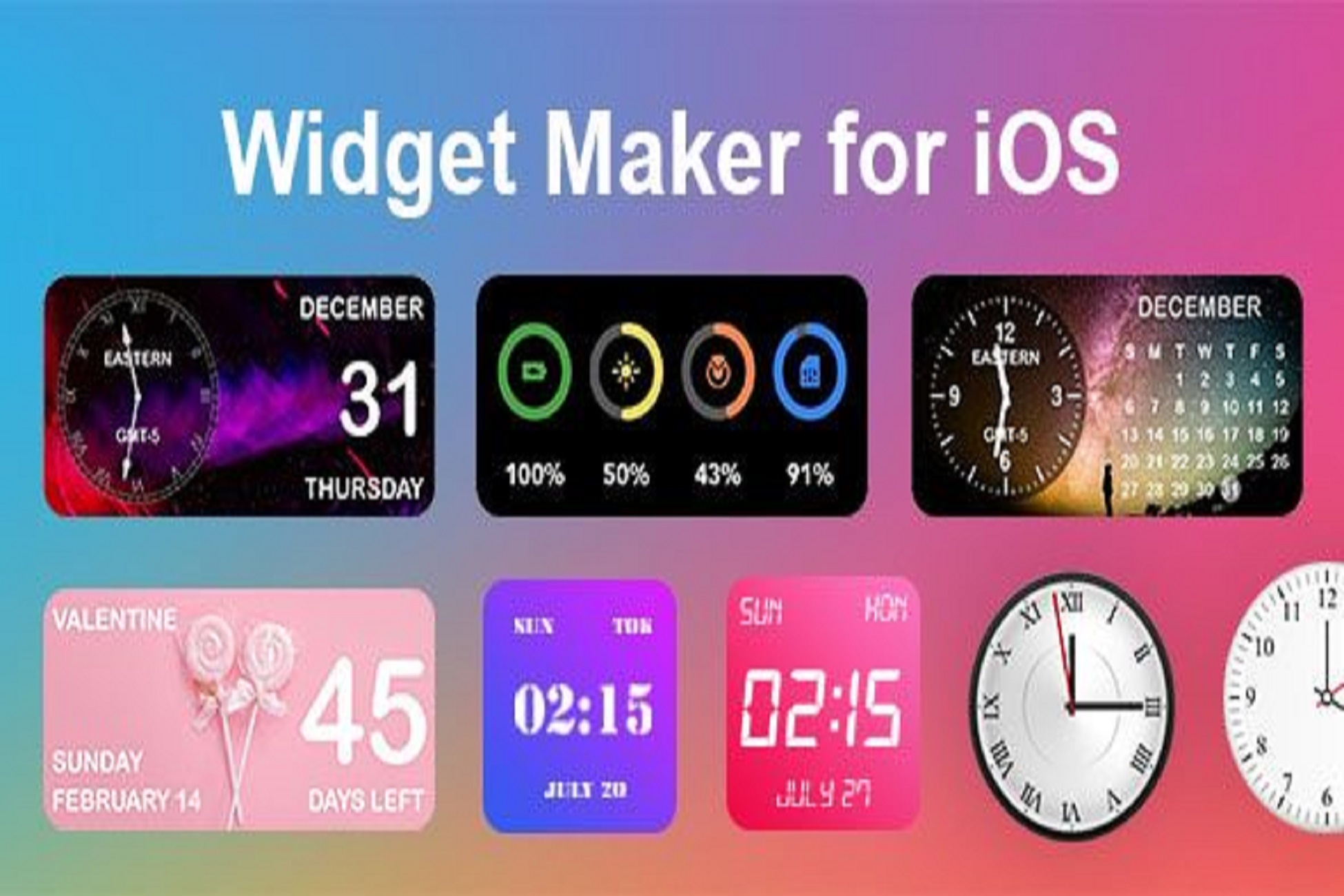
The Color Widget for iOS plugin brings the clean, modern aesthetic of Apple’s mobile OS directly to your WordPress website. This powerful tool is designed for creators looking to enhance their site with sleek, customizable widgets that mimic the look and feel of an iOS home screen. It’s a perfect fit for tech blogs, app landing pages, designer portfolios, or any site aiming for a contemporary and visually engaging user interface that stands out from the crowd.
*IF YOU'RE USING THEM IN A PRODUCT, YOU MUST BUY THEM. 💰*
By integrating these familiar design elements, you create an instantly recognizable and engaging experience. The polished look adds a layer of professionalism and sophistication that is often difficult and costly to achieve with standard WordPress elements alone. The Color Widget for iOS gives your most important content a structured, app-like presentation that captures attention and guides users effectively through your sales funnels or informational pathways.
Key Features
Limitless Customization Options
Create an unlimited number of widgets, each with its own unique styling. You have full granular control over background colors, beautiful gradients, adjustable border radius, and subtle shadows to perfectly match your brand’s specific identity and design language.
Rich Content & Iconography
Easily populate each widget with a title, a descriptive paragraph, and a relevant icon. Choose from a comprehensive built-in icon library or elevate your design by uploading your own custom SVG icons for a truly personalized and professional touch. Typography settings allow you to manage font colors and alignment with ease.
Seamless Page Builder Integration
The plugin works flawlessly as a standard WordPress widget right out of the box, but it also includes dedicated support for the most popular page builders, including Elementor and WPBakery. This enables a simple drag-and-drop implementation into any page layout.
Inherently Responsive Design
Every widget you create is automatically and intelligently optimized for all screen sizes. Your carefully crafted designs will look stunning and function perfectly on desktops, tablets, and mobile devices without requiring any additional configuration or custom code.
Use Cases
Unlock new ways to present your content and guide user actions. You can use the Color Widget for iOS to build visually striking call-to-action blocks that encourage newsletter sign-ups or drive product purchases. For software and app developers, it’s an ideal way to showcase key features in a format that resonates with a tech-savvy audience, making your product page more dynamic, trustworthy, and ultimately more persuasive.
Bloggers and content creators can leverage these widgets to highlight their latest articles, promote affiliate products, or create stylish links to social media profiles. The vibrant, organized blocks effectively break up long-form text and draw the reader’s eye to specific content, boosting engagement and click-through rates. It’s an excellent tool for transforming a static homepage or sidebar into a more interactive and modern user journey.
Benefits
One of the greatest benefits is its simplicity and accessibility. You don’t need to be a developer or write a single line of code to achieve a high-end, premium look. The intuitive interface empowers you to design and deploy beautiful elements in minutes, saving valuable time and the considerable expense of custom development. The Color Widget for iOS makes sophisticated, modern design achievable for everyone, regardless of technical skill.
From a user experience perspective, the Color Widget for iOS provides a comforting sense of familiarity and clarity. Visitors who are accustomed to the iOS ecosystem will find your site’s layout feels intuitive and effortless to navigate. This subtle design choice can build immediate trust and encourage deeper exploration of your website, leading to improved engagement metrics, longer session durations, and a more positive brand perception.
Beyond its core functionality, the plugin is a versatile design asset that promotes creative freedom. While it expertly provides the distinct iOS aesthetic, its deep customization options ensure it can adapt to any branding. By adjusting colors, typography, and icons, you can make the design uniquely yours. The Color Widget for iOS is therefore more than just a widget tool; it’s a foundational component for building a modern, clean, and memorable digital presence.
Requirements:
Build on Xcode 15.3
Support on iOS 17
*** IF YOU'VE FOUND A BUG OR BROKEN LINK, PLEASE LET US KNOW. 🐞🔗 **
Related Products

Same Contributor


Featured Products